cfn-initでEC2インスタンスにPHPをインストールしWebサーバーを起動する
2021/08/31
AWS CloudFormation による Amazon EC2 へのアプリケーションのデプロイを参考に実行してみました。
目次
起動するサーバー
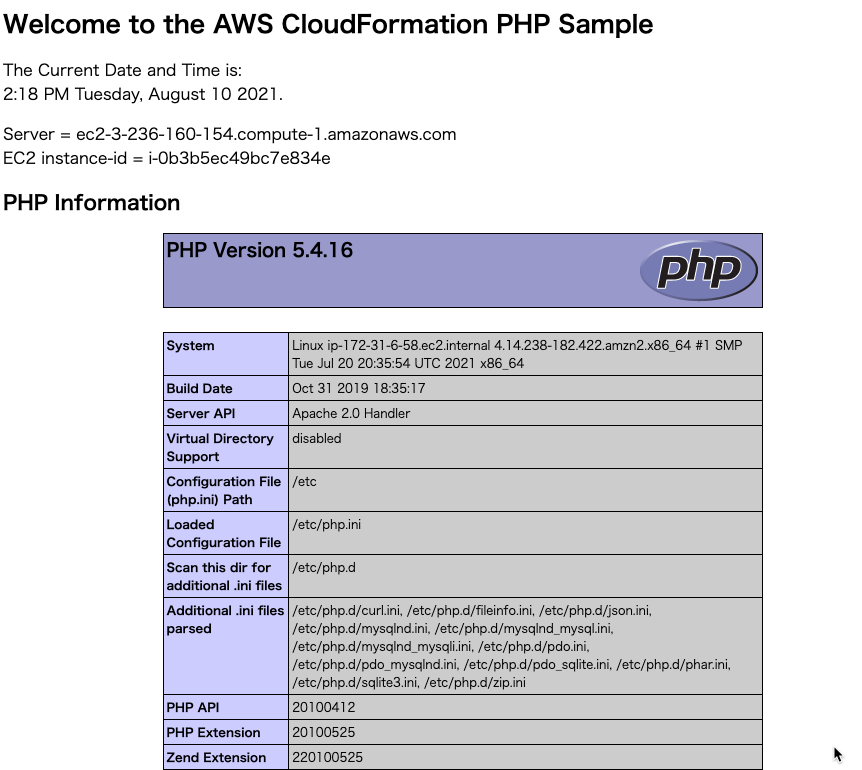
ブラウザからアクセスするとこのような画面が表示されるサーバーが起動します。
cfn-init
|
1 2 3 4 5 6 7 8 9 10 11 12 13 14 15 16 17 18 19 20 21 22 23 24 25 26 27 28 29 30 31 32 33 34 35 36 37 38 39 40 41 |
"Resources": { "WebServerInstance": { "Type": "AWS::EC2::Instance", "Metadata": { "AWS::CloudFormation::Init": { "configSets": { "Install": [ "Install" ] }, "Install": { "packages": { "yum": { "httpd": [], "php": [] } }, "files": { "/var/www/html/index.php": { "content": { "Fn::Join": [ ~省略~ ] }, "mode": "000600", "owner": "apache", "group": "apache" } }, "services": { "sysvinit": { "httpd": { "enabled": "true", "ensureRunning": "true" } } } } } }, |
Installでhttpd, phpをインストール。
filesでindex.phpを設定。
servicesでhttpdを起動。
UserData
|
1 2 3 4 5 6 7 8 9 10 11 12 13 14 15 16 17 18 19 20 21 22 23 24 25 26 27 28 29 30 31 32 33 34 35 36 37 |
"UserData": { "Fn::Base64": { "Fn::Join": [ "", [ "#!/bin/bash -xe\n", "yum install -y aws-cfn-bootstrap\n", "# Install the files and packages from the metadata\n", "/opt/aws/bin/cfn-init -v ", " --stack ", { "Ref": "AWS::StackName" }, " --resource WebServerInstance ", " --configsets Install ", " --region ", { "Ref": "AWS::Region" }, "\n", "# Signal the status from cfn-init\n", "/opt/aws/bin/cfn-signal -e $? ", " --stack ", { "Ref": "AWS::StackName" }, " --resource WebServerInstance ", " --region ", { "Ref": "AWS::Region" }, "\n" ] ] } } |
/opt/aws/bin/cfn-initでcfn-initを実行。
/opt/aws/bin/cfn-signalでデプロイ完了を送信。
CreationPolicy
|
1 2 3 4 5 6 |
"CreationPolicy": { "ResourceSignal": { "Timeout": "PT5M" } } |
cfn-signalの信号を受け取って、リソース作成完了とする。
テンプレート
行数を減らすためにParameters, Mappingsを極力省いていますので、検証環境向けと捉えてください。
バージニア北部リージョンのAMIを直接記述しています。
Jsonテンプレート
|
1 2 3 4 5 6 7 8 9 10 11 12 13 14 15 16 17 18 19 20 21 22 23 24 25 26 27 28 29 30 31 32 33 34 35 36 37 38 39 40 41 42 43 44 45 46 47 48 49 50 51 52 53 54 55 56 57 58 59 60 61 62 63 64 65 66 67 68 69 70 71 72 73 74 75 76 77 78 79 80 81 82 83 84 85 86 87 88 89 90 91 92 93 94 95 96 97 98 99 100 101 102 103 104 105 106 107 108 109 110 111 112 113 114 115 116 117 118 119 120 121 122 123 124 125 126 127 128 129 130 131 132 133 134 135 136 137 138 139 140 141 142 143 144 145 146 147 148 149 150 151 152 153 154 155 156 157 158 159 160 161 162 163 164 165 166 167 168 169 170 171 172 173 174 175 176 177 178 179 180 181 182 183 184 185 186 187 188 189 190 191 192 193 194 195 196 |
{ "AWSTemplateFormatVersion": "2010-09-09", "Parameters": { "KeyName": { "Description": "Name of an existing EC2 KeyPair to enable SSH access to the instance", "Type": "AWS::EC2::KeyPair::KeyName", "ConstraintDescription": "Can contain only ASCII characters." } }, "Resources": { "WebServerInstance": { "Type": "AWS::EC2::Instance", "Metadata": { "AWS::CloudFormation::Init": { "configSets": { "Install": [ "Install" ] }, "Install": { "packages": { "yum": { "httpd": [], "php": [] } }, "files": { "/var/www/html/index.php": { "content": { "Fn::Join": [ "", [ "<html>\n", " <head>\n", " <title>AWS CloudFormation PHP Sample</title>\n", " <meta http-equiv=\"Content-Type\" content=\"text/html; charset=ISO-8859-1\">\n", " </head>\n", " <body>\n", " <h1>Welcome to the AWS CloudFormation PHP Sample</h1>\n", " <p/>\n", " <?php\n", " // Print out the current data and time\n", " print \"The Current Date and Time is: <br/>\";\n", " print date(\"g:i A l, F j Y.\");\n", " ?>\n", " <p/>\n", " <?php\n", " // Setup a handle for CURL\n", " $curl_handle=curl_init();\n", " curl_setopt($curl_handle,CURLOPT_CONNECTTIMEOUT,2);\n", " curl_setopt($curl_handle,CURLOPT_RETURNTRANSFER,1);\n", " // Get the hostname of the instance from the instance metadata\n", " curl_setopt($curl_handle,CURLOPT_URL,'http://169.254.169.254/latest/meta-data/public-hostname');\n", " $hostname = curl_exec($curl_handle);\n", " if (empty($hostname))\n", " {\n", " print \"Sorry, for some reason, we got no hostname back <br />\";\n", " }\n", " else\n", " {\n", " print \"Server = \" . $hostname . \"<br />\";\n", " }\n", " // Get the instance-id of the instance from the instance metadata\n", " curl_setopt($curl_handle,CURLOPT_URL,'http://169.254.169.254/latest/meta-data/instance-id');\n", " $instanceid = curl_exec($curl_handle);\n", " if (empty($instanceid))\n", " {\n", " print \"Sorry, for some reason, we got no instance id back <br />\";\n", " }\n", " else\n", " {\n", " print \"EC2 instance-id = \" . $instanceid . \"<br />\";\n", " }\n", " ?>\n", " <h2>PHP Information</h2>\n", " <p/>\n", " <?php\n", " phpinfo();\n", " ?>\n", " </body>\n", "</html>\n" ] ] }, "mode": "000600", "owner": "apache", "group": "apache" } }, "services": { "sysvinit": { "httpd": { "enabled": "true", "ensureRunning": "true" } } } } } }, "Properties": { "ImageId": "ami-0c2b8ca1dad447f8a", "InstanceType": "t3.small", "SecurityGroups": [ { "Ref": "WebServerSecurityGroup" } ], "KeyName": { "Ref": "KeyName" }, "UserData": { "Fn::Base64": { "Fn::Join": [ "", [ "#!/bin/bash -xe\n", "yum install -y aws-cfn-bootstrap\n", "# Install the files and packages from the metadata\n", "/opt/aws/bin/cfn-init -v ", " --stack ", { "Ref": "AWS::StackName" }, " --resource WebServerInstance ", " --configsets Install ", " --region ", { "Ref": "AWS::Region" }, "\n", "# Signal the status from cfn-init\n", "/opt/aws/bin/cfn-signal -e $? ", " --stack ", { "Ref": "AWS::StackName" }, " --resource WebServerInstance ", " --region ", { "Ref": "AWS::Region" }, "\n" ] ] } } }, "CreationPolicy": { "ResourceSignal": { "Timeout": "PT5M" } } }, "WebServerSecurityGroup": { "Type": "AWS::EC2::SecurityGroup", "Properties": { "GroupDescription": "Enable HTTP access via port 80", "SecurityGroupIngress": [ { "IpProtocol": "tcp", "FromPort": "80", "ToPort": "80", "CidrIp": "0.0.0.0/0" }, { "IpProtocol": "tcp", "FromPort": "22", "ToPort": "22", "CidrIp": "0.0.0.0/0" } ] } } }, "Outputs": { "WebsiteURL": { "Description": "URL for newly created LAMP stack", "Value": { "Fn::Join": [ "", [ "http://", { "Fn::GetAtt": [ "WebServerInstance", "PublicDnsName" ] } ] ] } } } } |
Yamlテンプレート
|
1 2 3 4 5 6 7 8 9 10 11 12 13 14 15 16 17 18 19 20 21 22 23 24 25 26 27 28 29 30 31 32 33 34 35 36 37 38 39 40 41 42 43 44 45 46 47 48 49 50 51 52 53 54 55 56 57 58 59 60 61 62 63 64 65 66 67 68 69 70 71 72 73 74 75 76 77 78 79 80 81 82 83 84 85 86 87 88 89 90 91 92 93 94 95 96 97 98 99 100 101 102 103 104 105 106 107 108 109 110 111 112 113 114 115 116 117 118 119 120 121 122 123 124 125 126 127 128 129 130 131 132 133 134 135 136 137 138 139 140 141 142 143 144 145 146 147 148 149 150 151 152 153 154 155 156 157 158 159 160 161 162 163 164 165 166 167 168 169 170 171 172 173 174 175 176 177 178 179 180 181 182 183 184 185 186 187 188 189 190 |
AWSTemplateFormatVersion: 2010-09-09 Parameters: KeyName: Description: Name of an existing EC2 KeyPair to enable SSH access to the instance Type: 'AWS::EC2::KeyPair::KeyName' ConstraintDescription: Can contain only ASCII characters. Resources: WebServerInstance: Type: 'AWS::EC2::Instance' Metadata: 'AWS::CloudFormation::Init': configSets: Install: - Install Install: packages: yum: httpd: [] php: [] files: /var/www/html/index.php: content: !Join - '' - - | <html> - |2 <head> - |2 <title>AWS CloudFormation PHP Sample</title> - |2 <meta http-equiv="Content-Type" content="text/html; charset=ISO-8859-1"> - |2 </head> - |2 <body> - |2 <h1>Welcome to the AWS CloudFormation PHP Sample</h1> - |2 <p/> - |2 <?php - |2 // Print out the current data and time - |2 print "The Current Date and Time is: <br/>"; - |2 print date("g:i A l, F j Y."); - |2 ?> - |2 <p/> - |2 <?php - |2 // Setup a handle for CURL - |2 $curl_handle=curl_init(); - |2 curl_setopt($curl_handle,CURLOPT_CONNECTTIMEOUT,2); - |2 curl_setopt($curl_handle,CURLOPT_RETURNTRANSFER,1); - |2 // Get the hostname of the instance from the instance metadata - |2 curl_setopt($curl_handle,CURLOPT_URL,'http://169.254.169.254/latest/meta-data/public-hostname'); - |2 $hostname = curl_exec($curl_handle); - |2 if (empty($hostname)) - |2 { - |2 print "Sorry, for some reason, we got no hostname back <br />"; - |2 } - |2 else - |2 { - |2 print "Server = " . $hostname . "<br />"; - |2 } - |2 // Get the instance-id of the instance from the instance metadata - |2 curl_setopt($curl_handle,CURLOPT_URL,'http://169.254.169.254/latest/meta-data/instance-id'); - |2 $instanceid = curl_exec($curl_handle); - |2 if (empty($instanceid)) - |2 { - |2 print "Sorry, for some reason, we got no instance id back <br />"; - |2 } - |2 else - |2 { - |2 print "EC2 instance-id = " . $instanceid . "<br />"; - |2 } - |2 ?> - |2 <h2>PHP Information</h2> - |2 <p/> - |2 <?php - |2 phpinfo(); - |2 ?> - |2 </body> - | </html> mode: '000600' owner: apache group: apache services: sysvinit: httpd: enabled: 'true' ensureRunning: 'true' Properties: ImageId: ami-0c2b8ca1dad447f8a InstanceType: t3.small SecurityGroups: - !Ref WebServerSecurityGroup KeyName: !Ref KeyName UserData: !Base64 'Fn::Join': - '' - - | #!/bin/bash -xe - | yum install -y aws-cfn-bootstrap - | # Install the files and packages from the metadata - '/opt/aws/bin/cfn-init -v ' - ' --stack ' - !Ref 'AWS::StackName' - ' --resource WebServerInstance ' - ' --configsets Install ' - ' --region ' - !Ref 'AWS::Region' - |+ - | # Signal the status from cfn-init - '/opt/aws/bin/cfn-signal -e $? ' - ' --stack ' - !Ref 'AWS::StackName' - ' --resource WebServerInstance ' - ' --region ' - !Ref 'AWS::Region' - |+ CreationPolicy: ResourceSignal: Timeout: PT5M WebServerSecurityGroup: Type: 'AWS::EC2::SecurityGroup' Properties: GroupDescription: Enable HTTP access via port 80 SecurityGroupIngress: - IpProtocol: tcp FromPort: '80' ToPort: '80' CidrIp: 0.0.0.0/0 - IpProtocol: tcp FromPort: '22' ToPort: '22' CidrIp: 0.0.0.0/0 Outputs: WebsiteURL: Description: URL for newly created LAMP stack Value: !Join - '' - - 'http://' - !GetAtt - WebServerInstance - PublicDnsName |
最後までお読みいただきましてありがとうございました!
「AWS認定資格試験テキスト&問題集 AWS認定ソリューションアーキテクト - プロフェッショナル 改訂第2版」という本を書きました。
「AWS認定資格試験テキスト AWS認定クラウドプラクティショナー 改訂第3版」という本を書きました。
「AWS認定資格試験テキスト AWS認定AIプラクティショナー」という本を書きました。
「AWS教科書 AWS認定デベロッパーアソシエイト テキスト&問題集 」という本を書きました。
「要点整理から攻略するAWS認定ソリューションアーキテクト-アソシエイト」という本を書きました。
「AWSではじめるLinux入門ガイド」という本を書きました。

開発ベンダー5年、ユーザ企業システム部門通算9年、ITインストラクター5年目でプロトタイプビルダーもやりだしたSoftware Engineerです。
質問はコメントかSNSなどからお気軽にどうぞ。
出来る限りなるべく答えます。
このブログの内容/発言の一切は個人の見解であり、所属する組織とは関係ありません。
このブログは経験したことなどの共有を目的としており、手順や結果などを保証するものではありません。
ご参考にされる際は、読者様自身のご判断にてご対応をお願いいたします。
また、勉強会やイベントのレポートは自分が気になったことをメモしたり、聞いて思ったことを書いていますので、登壇者の意見や発表内容ではありません。

関連記事
-
-
AWS Secrets Manager交代ユーザーローテーション
AWS Secrets Managerの交代ユーザーローテーションを確認してみま …
-
-
AWSのAmazon LinuxにGitマスターサーバをインストールしてRedmineリポジトリブラウザで見る
Amazon LinuxにGitをインストールする Gitをインストールして自動 …
-
-
EC2インスタンスを必要最小限のパラメータでCLIとSDKから起動する
EC2インスタンスをCLIとSDKから起動するデモで、パラメータを必要最小限にし …
-
-
AWS IAMのMFA「エンティティは既に存在しています」に対応しました
エンティティは既に存在しています MFA Device entity at th …
-
-
EC2 VyOSで/etc/resolv.confを設定しました
EC2でVyOSを起動してSSHで接続して確認していたところ、どうもVyOSから …
-
-
Organizations組織でAWS SSOを有効にする
先日AWS Control Towerで環境を作ったら、自動でAWS SSOがで …
-
-
AWS LambdaをVPC設定したときに「The provided execution role does not have permissions to call CreateNetworkInterface on EC2」
The provided execution role does not hav …
-
-
AWS Expert Online at JAWS-UG首都圏エリアに参加して「Amazon EC2 スポットインスタンス再入門」を聞いてきた
AWS Expert Onlineという勉強会がありまして、AWS ソリューショ …
-
-
API GatewayからLambdaを介さずにSNSトピックへ送信
やりたいこと APIリクエストをまずLambdaで受けて、SNSトピックへ送信す …
-
-
API GatewayをトリガーにしたときのLambdaリソースベースポリシー
先日、SwaggerからAPI Gatewayを作ったときに、API Gatew …