AWS Client VPNの接続ログを確認しました
2021/07/07
AWS Client VPNを設定しましたで証明書とかせっかく作ったので、いろいろ試してみます。
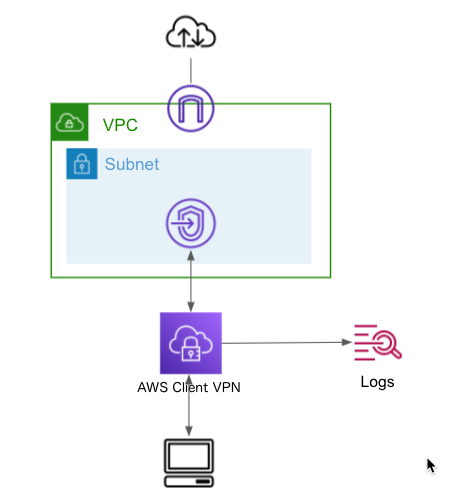
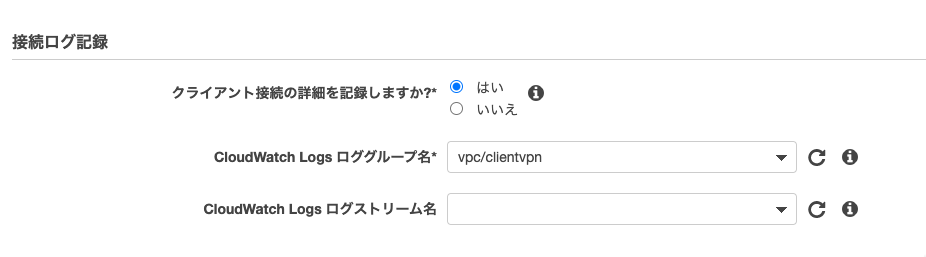
接続ログを有効にしてみました。
CloudWatchのロググループは、事前に作成しておく必要がありました。
ログストリームは自動生成されました。
目次
接続成功のログ
|
1 2 3 4 5 6 7 8 9 10 11 12 13 14 15 16 17 18 19 20 21 22 |
{ "connection-log-type": "connection-attempt", "connection-attempt-status": "successful", "connection-attempt-failure-reason": "NA", "connection-id": "cvpn-connection-0858586fa04af3dc8", "client-vpn-endpoint-id": "cvpn-endpoint-0702364d39b4e5304", "transport-protocol": "udp", "connection-start-time": "2021-07-07 13:38:37", "connection-last-update-time": "2021-07-07 13:38:37", "client-ip": "192.168.0.130", "common-name": "client1.domain.tld", "device-type": "mac", "device-ip": "xxx.xxx.xxx.xxx", "port": "62349", "ingress-bytes": "0", "egress-bytes": "0", "ingress-packets": "0", "egress-packets": "0", "connection-end-time": "NA", "connection-duration-seconds": "0" } |
クライアントIPは接続成功して設定されるのですね。
接続失敗のログ
|
1 2 3 4 5 6 7 8 9 10 11 12 13 14 15 16 17 18 19 20 21 22 |
{ "connection-log-type": "connection-attempt", "connection-attempt-status": "failed", "connection-attempt-failure-reason": "client-connect-handler-invalid-response", "connection-id": "cvpn-connection-015ea98db63257637", "client-vpn-endpoint-id": "cvpn-endpoint-0702364d39b4e5304", "transport-protocol": "udp", "connection-start-time": "NA", "connection-last-update-time": "2021-07-07 13:37:55", "client-ip": "NA", "common-name": "client1.domain.tld", "device-type": "mac", "device-ip": "xxx.xxx.xxx.xxx", "port": "63453", "ingress-bytes": "0", "egress-bytes": "0", "ingress-packets": "0", "egress-packets": "0", "connection-end-time": "NA", "connection-duration-seconds": "NA" } |
これは、AWS Client VPNのクライアント接続ハンドラを試してみましたを試しているときに、レスポンススキーマを間違えてたときのログです。
切断のログ
|
1 2 3 4 5 6 7 8 9 10 11 12 13 14 15 16 17 18 19 20 21 22 23 |
{ "connection-log-type": "connection-reset", "connection-attempt-status": "NA", "connection-attempt-failure-reason": "NA", "connection-id": "cvpn-connection-0858586fa04af3dc8", "client-vpn-endpoint-id": "cvpn-endpoint-0702364d39b4e5304", "transport-protocol": "udp", "connection-start-time": "2021-07-07 13:38:37", "connection-last-update-time": "2021-07-07 13:49:08", "client-ip": "192.168.0.130", "common-name": "client1.domain.tld", "device-type": "mac", "device-ip": "xxx.xxx.xxx.xxx", "port": "62349", "ingress-bytes": "6485552", "egress-bytes": "18366976", "ingress-packets": "18947", "egress-packets": "21526", "connection-end-time": "2021-07-07 13:49:08", "connection-reset-status": "NA", "connection-duration-seconds": "631" } |
最後までお読みいただきましてありがとうございました!
「AWS認定資格試験テキスト&問題集 AWS認定ソリューションアーキテクト - プロフェッショナル 改訂第2版」という本を書きました。
「AWS認定資格試験テキスト AWS認定クラウドプラクティショナー 改訂第3版」という本を書きました。
「ポケットスタディ AWS認定 デベロッパーアソシエイト [DVA-C02対応] 」という本を書きました。

「要点整理から攻略するAWS認定ソリューションアーキテクト-アソシエイト」という本を書きました。
「AWSではじめるLinux入門ガイド」という本を書きました。

開発ベンダー5年、ユーザ企業システム部門通算9年、ITインストラクター5年目でプロトタイプビルダーもやりだしたSoftware Engineerです。
質問はコメントかSNSなどからお気軽にどうぞ。
出来る限りなるべく答えます。
このブログの内容/発言の一切は個人の見解であり、所属する組織とは関係ありません。
このブログは経験したことなどの共有を目的としており、手順や結果などを保証するものではありません。
ご参考にされる際は、読者様自身のご判断にてご対応をお願いいたします。
また、勉強会やイベントのレポートは自分が気になったことをメモしたり、聞いて思ったことを書いていますので、登壇者の意見や発表内容ではありません。
ad
ad

関連記事
-
-
ブログのアーキテクチャをコストベースで見直しました
当ブログはAWSで構築しています。 アーキテクチャをコストを最重視して見直しまし …
-
-
Amazon FSx for Lustreのユーザーガイド入門演習
ファイルシステムの作成 FSx for Lustreを選択しました。 容量やスル …
-
-
AWS Certificate Manager(ACM)メール検証をDNS検証の証明書に差し替えました
ブログの証明書 このブログの証明書の有効期限があと1週間です。 証明書はAWS …
-
-
「CMC_Central 2024」に参加しました
個人サポーターとしてCMC_Central 2024に参加しました。 オープニン …
-
-
WordPressの年ごとのブログ投稿数を調べるSQL
毎年年末に使いそうなのでメモです。 [crayon-68696f65577ae5 …
-
-
EC2スポットインスタンスの中断通知を受ける
オートスケーリンググループでEC2インスタンスをスポットインスタンスで使用してい …
-
-
Amazon SageMakerプロジェクトを使用してMLパイプラインを構築
SageMakerプロジェクトの作成 SageMaker Studioの左ナビゲ …
-
-
Amazon Route 53 Resolverを設定確認
Route 53 Resolverを設定しました。 東京リージョンのVPCをオン …
-
-
AWS Lambda KMSを使って環境変数を暗号化、復号化する(Python)
Lambda内で外部APIを使用する場合などをユースケースとして、環境変数をKM …
-
-
API GatewayからLambdaを介さずにSNSトピックへ送信
やりたいこと APIリクエストをまずLambdaで受けて、SNSトピックへ送信す …